Recently, I’ve been doing some vector art and animations for my new Android app, a stock market tracker, and every time I open Inkscape1, it greets me with the same default template: the same page size, the same units, the same settings I never use. The next thing I do, every single time, is open the document properties and change everything to the way I want it. After the twentieth repetition, I decided it was a chore that needed to die, so I went looking for a way to set the default template once and forget about it.
Every child is an artist. The problem is how to remain an artist once we grow up.
~ Pablo Picasso.
So, I searched the internet on how to basically set the default template to my liking. As it turns out, the fix is simpler than it looks. Inkscape reads its default template from a single file, and if you replace that file with one saved the way you like, every new document starts exactly how you want it.
🎨 Steps to change the default template
1. Create a New Document
Create a new document and set its document properties, which can be found on File > Document Properties. This is where you choose the page size, orientation, units, background color, and every other setting you keep changing by hand.
2. Open the Document Properties Dialog
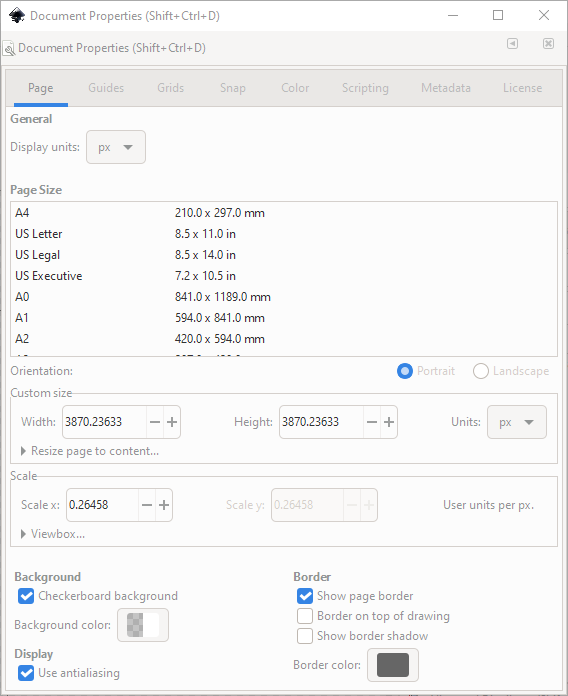
It will show a simple dialog, which looks like this:
3. Customize Everything
In the dialog, do what you like. Modify it based on what you want to see every time you open Inkscape. Do not rush this step; this is the moment to set everything exactly the way you want, because every future document will inherit it.
4. Save to the Inkscape Template Directory
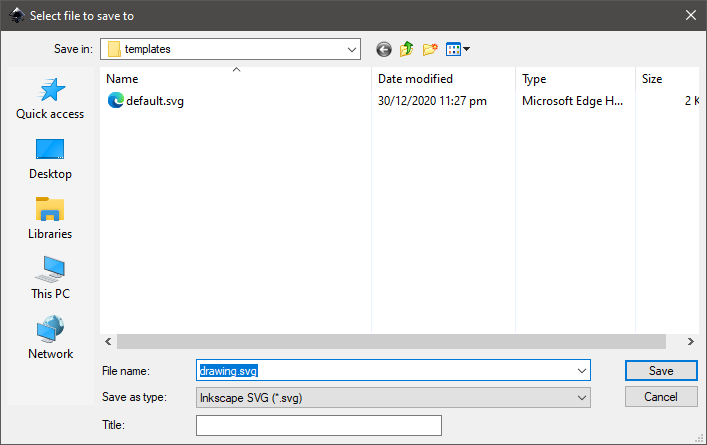
After that, do a File > Save As... and save it to your local user Inkscape directory, which will be in C:\Users\<your-user>\AppData\Roaming\Inkscape\template.
5. Name It default.svg
Save it as default.svg. The filename matters: only default.svg will be picked up as the template for new documents, so do not be creative here.
6. Restart Inkscape
Then restart Inkscape for the changes to take effect.
Enjoy, that’s all. 🍂
🧠 Final Thoughts
Now every new project opens with my preferred settings, no chore required. It took me longer to get annoyed by the daily repetition than it took to fix it, which is how most good workflow discoveries go. If you have your own Inkscape defaults, tweak them the same way, and save yourself the same daily dance.
- Inkscape is a free and open-source vector graphics editor used to create vector images, primarily in Scalable Vector Graphics (SVG) format. Other formats can be imported and exported. ↩︎