
Knowing others is wisdom, knowing yourself is enlightenment.
~ Lao Tzu.
It’s the start of the decentralization age, but how do you start programming in a decentralized environment? Every day the headlines talk about dApps and tokens, and behind all of them is a piece of code that someone wrote. That someone could be you, and the first step is smaller than it looks.
Ethereum1, considered the second wave of blockchain innovation, is the pioneer and first blockchain ecosystem to implement and handle smart contracts. So how do you start developing systems and applications, DApps (Decentralized Apps), on it?
The answer is “Solidity”, a programming language that interfaces the EVM (Ethereum Virtual Machine) and your app.
✅ Prerequisites
In this tutorial we assume you have some basic knowledge in programming. That is the whole requirement, no blockchain experience needed, and you will understand more than you expect by the end.
The main requirements in developing a blockchain app is first its compiler, then the secondary requirements but optional are the bootstrap frameworks like truffle.
- Node 10 and above
🏗️ Building Hello World
To start the development, we must get the required dependency in developing a structured smart contract project. The tool and framework that we will be using is truffle, which handles all the bootstrapping procedure and creates the base of your project. Installing it is just a breeze; all you have to do is type npm install -g truffle.
Also install ganache, which is the old ethereum-test-rpc project. To install ganache you have an option whether to install it as a desktop app or as a CLI (Command Line Interface) build. For this project I’ll be using the CLI build, so to start we install ganache using the command npm install -g ganache-cli. Both truffle and ganache are under the truffle software development platform. Think of truffle as the build tool and ganache as the pretend blockchain in your pocket: the perfect combination for learning.
And now we start building the project. After all dependencies are installed, we need to create an empty project directory with the command truffle init. As a note, the init sub-command only works on an empty directory. This sub-command will create a base structure for our project.
📂 Project Structure
Below is a structure that I recommend to bootstrap your project.
contracts: Storage of smart contracts source.migrations: Migration script to deploy smart contract.test: Test directory for smart contract.truffle-config.js: Truffle configuration for Windows users (for backward compatibility).truffle.js: Truffle configuration for *nix system.
To test if everything’s okay we must run truffle compile.
🧪 Running a test RPC for Ethereum
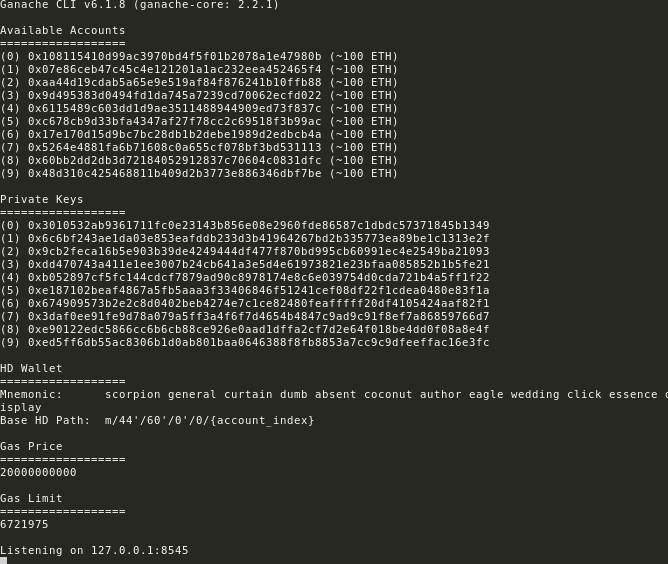
So in order to start, we first need to generate test accounts and run a test environment. Start by typing ganache-cli in a separate non-occupied terminal window. The tool ganache will generate 10 ETH addresses with an initial balance of 100 ether each. That is not real money, obviously, it is play money, which is exactly why learning here is free.
💬 Coding your first hello
With ganache-cli running in the background, we continue building our hello world project. To start, we must create a new contract using truffle create contract Hello, on which this command will create a new file under contracts ⇒ Hello.sol. Edit the newly created file and add a new function that will return the string Hello in EVM:
pragma solidity ^0.4.24;

contract Hello {
	function greeter() public pure returns (string) {
		return "Hello World";
	}
}
In the next step, we will be creating and editing the migration file. To create the file execute touch migrations/2_deploy_contracts.js, then edit the new file and link it to the file we created earlier, Hello.sol. This is a very crucial step in order to deploy our Hello solidity file on the test blockchain environment. The migration is the delivery truck that takes your contract to the network.
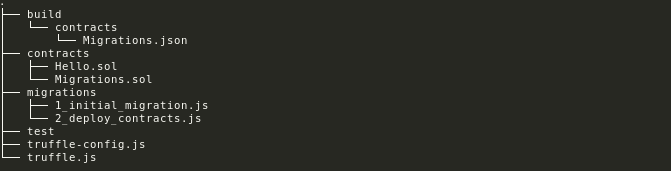
Here are the changes we need in migrations/2_deploy_contracts.js:
var hello = artifacts.require("./Hello.sol");
module.exports = function(deployer) {
	deployer.deploy(hello);
}
After we edit the migration file, we can now connect the truffle project to the ganache test blockchain RPC environment. To do that we’ll be editing truffle.js and point it to the ganache host and port which is localhost:8545:
module.exports = {
	networks: {
		development: {
			host: "localhost",
			port: 8545,
		},
	},
};
When everything’s done, execute truffle migrate. This command will automatically compile and deploy the smart contract into the ganache test blockchain RPC environment. Remember to copy the Hello function address from the output console; we will be using this later.
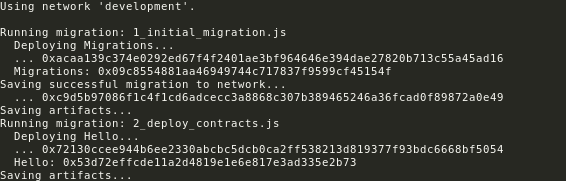
To test if the function is already deployed in the test environment, we will execute a REPL console using truffle console. Then inside the console, we type Hello.at(address).greeter() (note the address here is the one we copied earlier).

If everything is correct it should output Hello World. That’s it, now you’re on your way to becoming a blockchain developer. This is the link to the whole source code.
🧠 Final Thoughts
Hey guys, now that you’ve finished the setup, you are now on the path of becoming a blockchain software developer. The whole journey, from empty directory to a deployed contract with a working function call, took fewer tools than most web projects: a compiler, a test network, and a couple of commands.
The hello world is the door, not the destination. Behind it lie tokens, games, DAOs, and everything else the ecosystem is building, and every one of them started exactly the way this did, with a function returning a string on a test network. Follow us on our next adventure developing deep into the blockchain ecosystem. Stay tuned for the next follow up series for Solidity.
- Ethereum is an open source, public, blockchain-based distributed computing platform and operating system featuring smart contract functionality. It supports a modified version of Nakamoto consensus via transaction-based state transitions. ↩︎